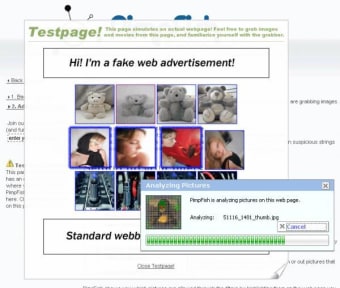
PimpFish is a desktop tool designed to help Windows users download images, videos, and audio files from websites with less hassle. It works through browser integration, offering shortcuts and automation for capturing media from galleries, pages, or streaming sites. Though originally released in the mid-2000s, it still serves users who need a simple way to gather online content in bulk.
PimpFish helps users save media files by scanning websites for downloadable content. It’s especially handy for grabbing multiple images or videos at once, using features like “SLAPfiles” to create and share download lists. The app also includes a built-in preview tool and lets users generate simple galleries from saved content, making it easier to organize and view large batches of media files on a local drive.
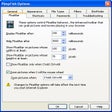
The software integrates with Internet Explorer and Firefox by adding toolbars that enable direct downloads from webpages. Right-click options and drag-and-drop support further simplify the process. While PimpFish doesn’t support modern browsers like Chrome or Edge, it still proves useful on older systems or for accessing specific websites. Additional features include content filtering, HTTPS fixes, and basic file organization, rounding out a practical toolset for focused media collection.
Final thoughts
PimpFish is a focused tool for downloading media content in bulk from websites. It doesn’t offer modern browser support, but it remains useful for users working in legacy environments. With built-in preview, filtering, and sharing options, it provides a straightforward way to collect and manage online media.
PimpFish is as you may, or may not know, the coolest thing to hit the internet since fiber optics. Or whatever. So check it out...
Grab, download, share and organize Flash, Quicktime or any other video, pictures or files you find on websites in a single click. Use this Download Manager, IE or Firefox toolbar and FloatBar to grab movies, zoom pics in your browser and share stuff. Use PimpFish to create, download and share SLAPfiles which let you share downloads lists with just a single file. SLAPfiles come with online tools such as a Google Video downloader and storage.
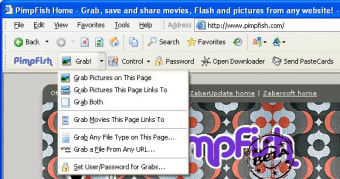
The PimpFish toolbar integrates in your browser (IE or Firefox) and enables you to save large amounts of pictures or movies or mp3 files or zip files or pink cows from any website in a single click for easy download in the background. This means that the PimpFish toolbar is where all the fun begins - most of the time. Furthermore the Toolbar is the main control part of PimpFish, meaning that through the Toolbar you access updates, settings and other neat little tools. And of course the PimpFish toolbar has the same gallery and playlist shortcuts n' handy features we all need when surfing the big 'ol WWW.
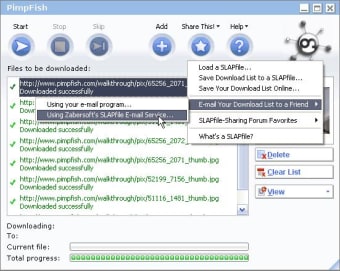
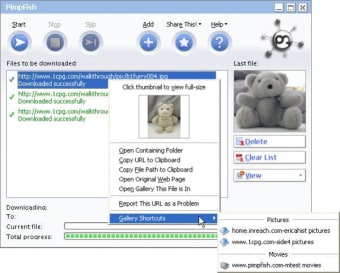
The PimpFish Download Manager is where all the final action is. This is the thing that is responsible for neatly downloading your grabbed stuff in the background, and at the same time keep everything a few clicks away so you don't have to go hunting for your stuff later. The Download Manager sports several sweet features such as a cool mini thumbnail viewer, live statistics, gallery shortcuts, extended download speed/error information, SLAPfiles integration and more. The Downloader is also mainly responsible for handling SLAPfiles - a neat download list share format.
SLAPfiles is in essence a collection of URL's pointing to any content on the web. All gathered in one place with your comment in it. Try to think of it as a hybrid between RSS and torrent files (except, it's not a P2P kinda thing).
Laws concerning the use of this software vary from country to country. We do not encourage or condone the use of this program if it is in violation of these laws. Softonic may receive a referral fee if you click or buy any of the products featured here.